AdminSignal kit · Version 1.0
Windows 11 26H2 Upgrade Kit
Get every device onto Windows 11, version 26H2 by the right route. A readiness script that tells you each device's route, an Intune detection script, rings, a pilot gate, validation, rollback and ready-to-send emails, for the enablement package and the full feature update.
- Know every device's route to 26H2 before you assign a single policy
- Run the enablement package and the full upgrade as separate, safe tracks
- Catch the compliance, Remote Desktop and USB audio problems in the pilot
- Keep a way back for both routes, written down before you start
Price includes VAT where it applies. Shown in your local currency at checkout.
Buy the kit for £29- Instant download: PDF, two scripts and editable templates
- Licensed for you or your whole team
- 30-day money-back guarantee
- Receipt and invoice for expenses
Secure checkout by Stripe. AdminSignal never sees your card details.
Written by Jack Hadcroft, an endpoint specialist who runs MECM, Intune and Tanium patching and feature updates day to day.


- 14-page PDF playbook
- Readiness + Intune detection scripts
- PowerShell 5.1 and 7
- No modules to install
- Team licence included
26H2 is a small update with a messy rollout
The payload is easy. Working out who gets what, and when, is not.
There is no single route
24H2 and 25H2 take a one-restart enablement package. 23H2 and Windows 10 need a full feature update. 26H1 and LTSC take neither. One "latest" policy gets most of the estate wrong.
The prerequisite stalls the pilot
Offer 26H2 to a device without KB5124010 and it sits there. The portal says pending, the pilot misses its gate, and the enablement package gets the blame.
A small update with real surprises
Three commercial defaults switch on, build 26300 trips compliance rules written for 26200, and Remote Desktop hosts with Administrator protection need a workaround.
The kit turns that into a plan: a route for every device, one track per route, gates you can defend, and a way back that is written down before you start.
What's inside
Everything from inventory to close-out
The decision on one page
Every starting version from Windows 10 22H2 to 26H1 and LTSC, its build, its route, what it takes and when it stops getting updates.
Get-26H2Readiness.ps1
A read-only report that gives every device an UpgradePath and a next step, with Windows 11 hardware checks, version pins, BitLocker, Secure Boot 2023 and appraiser results. CSV export.
Intune detection script
The same checks as a Remediations detection script. Every device reports its route in one line, without WinRM.
Route A: enablement package
The KB5124010 prerequisite, the channels that carry KB5121794 (and the one that does not), what changes, and notes for Intune, Autopatch, MECM, WSUS and Tanium.
Route B: full feature update
Hardware requirements including SSE4.2, a compatibility scan with exit codes, drivers and agents, and ESU for Windows 10 devices that cannot move.
Rings and the pilot gate
Pilot, early adopters, broad and exceptions with timings for each route, written stop conditions and a fill-in plan.
Validation and rollback
On-device checks that catch real problems, containment for the enablement package, and the go-back window and DISM commands for the full upgrade.
Emails and tracker
User notice, service desk briefing and status emails, a one-page programme board and Ring-Tracker.csv.
In the zip
- Windows-11-26H2-Upgrade-Kit.pdf
- Get-26H2Readiness.ps1
- Detect-26H2Readiness.ps1
- Upgrade-Runbook.md
- Email-Templates.md
- Ring-Tracker.csv
- README.txt
Look inside
Real pages from the PDF
Six of the fourteen pages. Select one to see it full size.
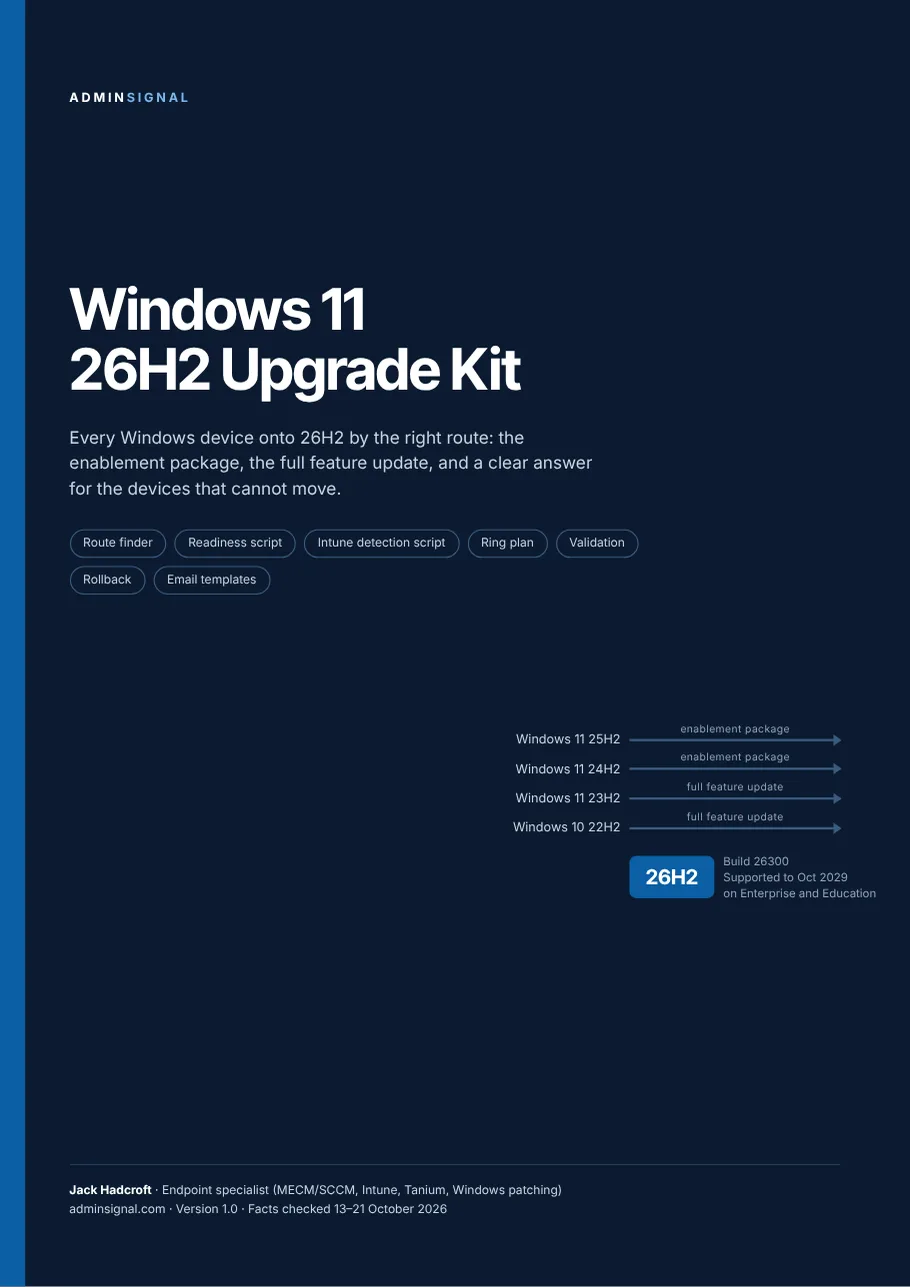
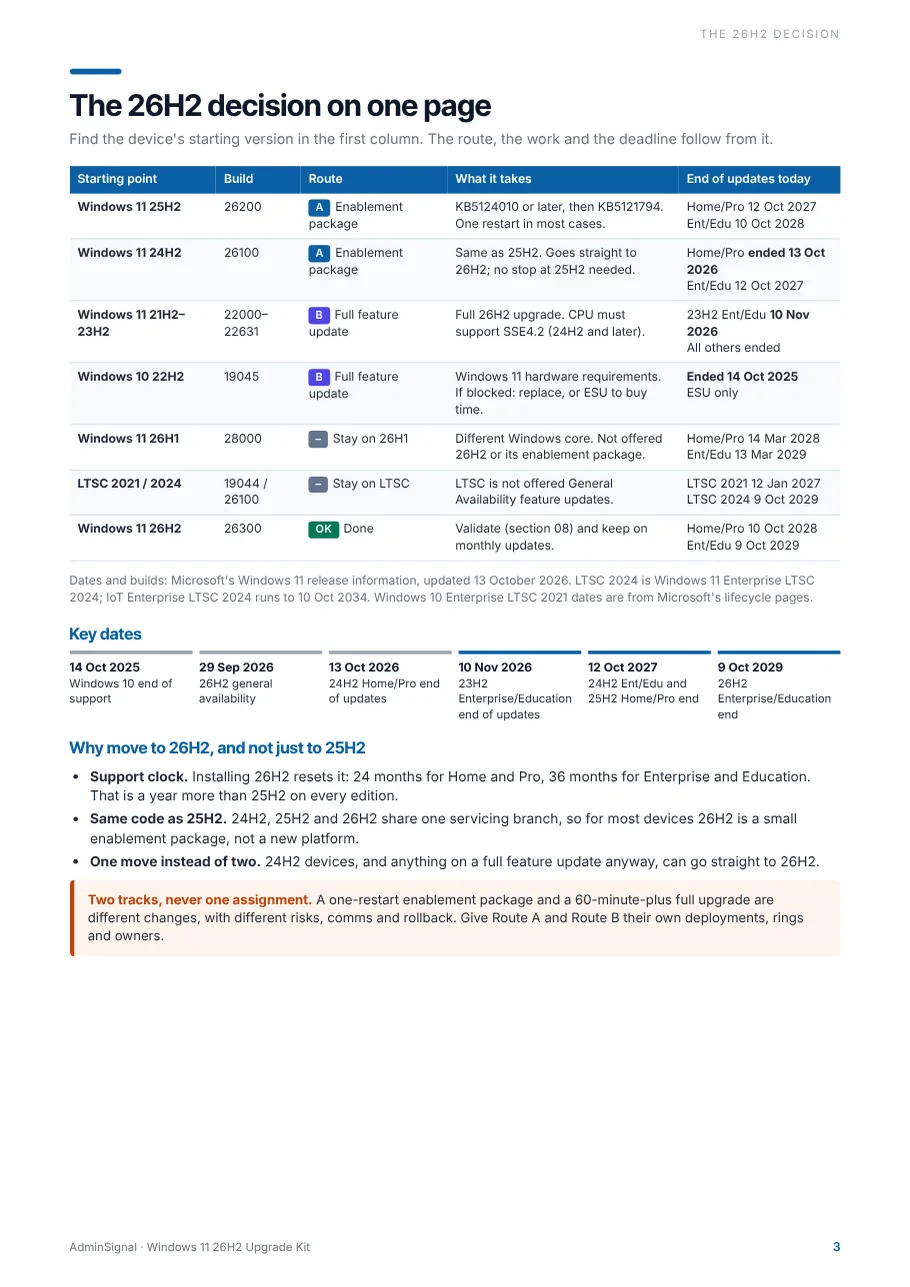
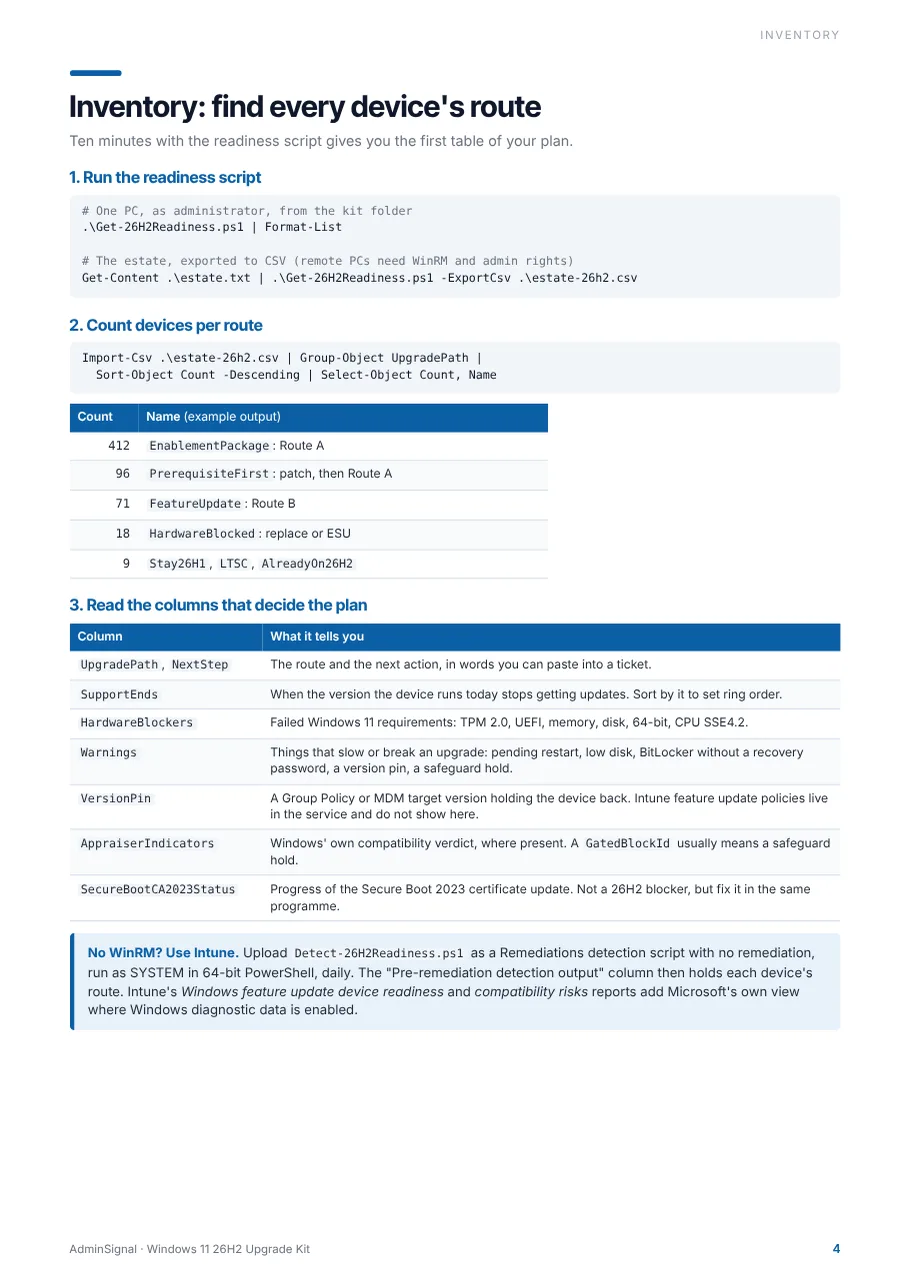
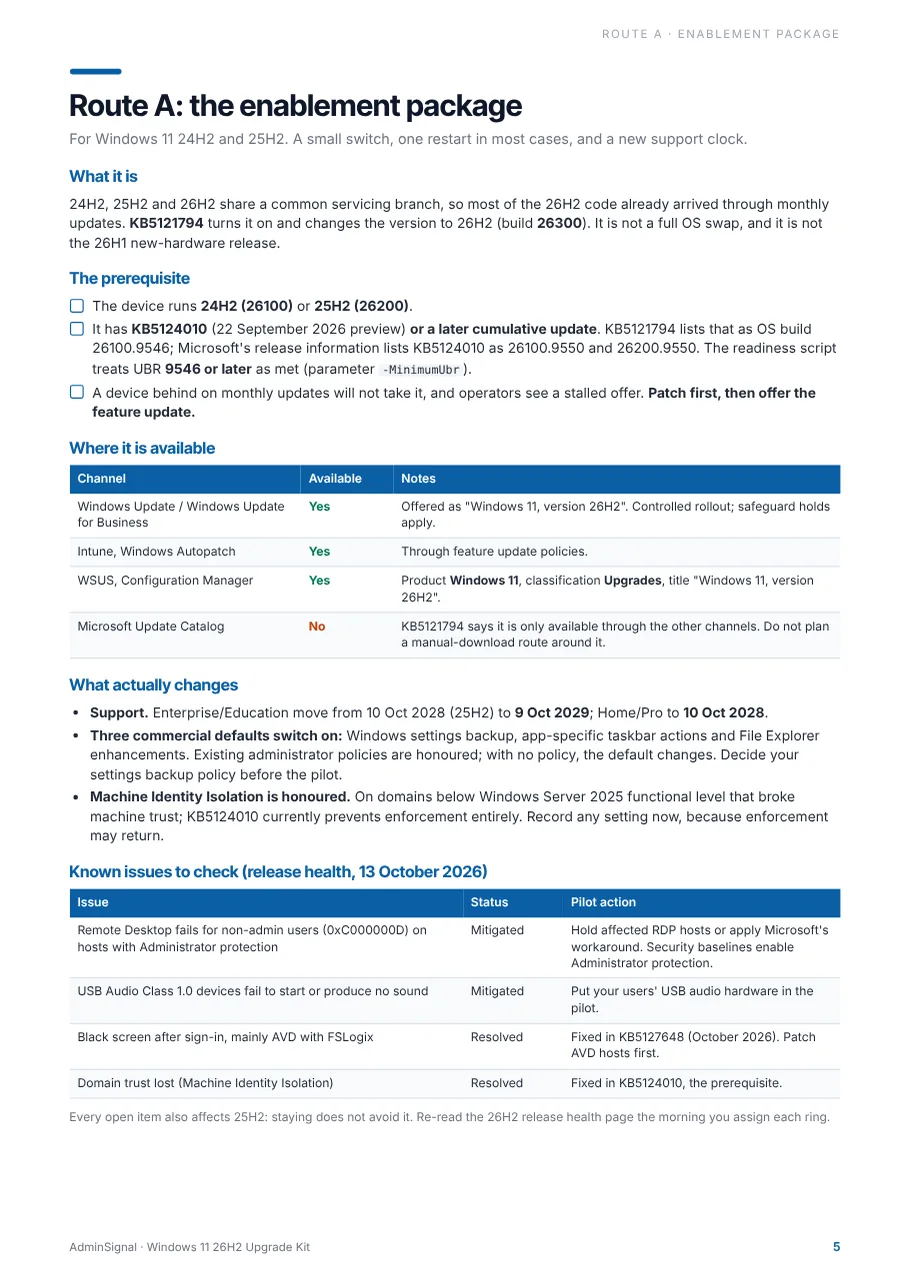
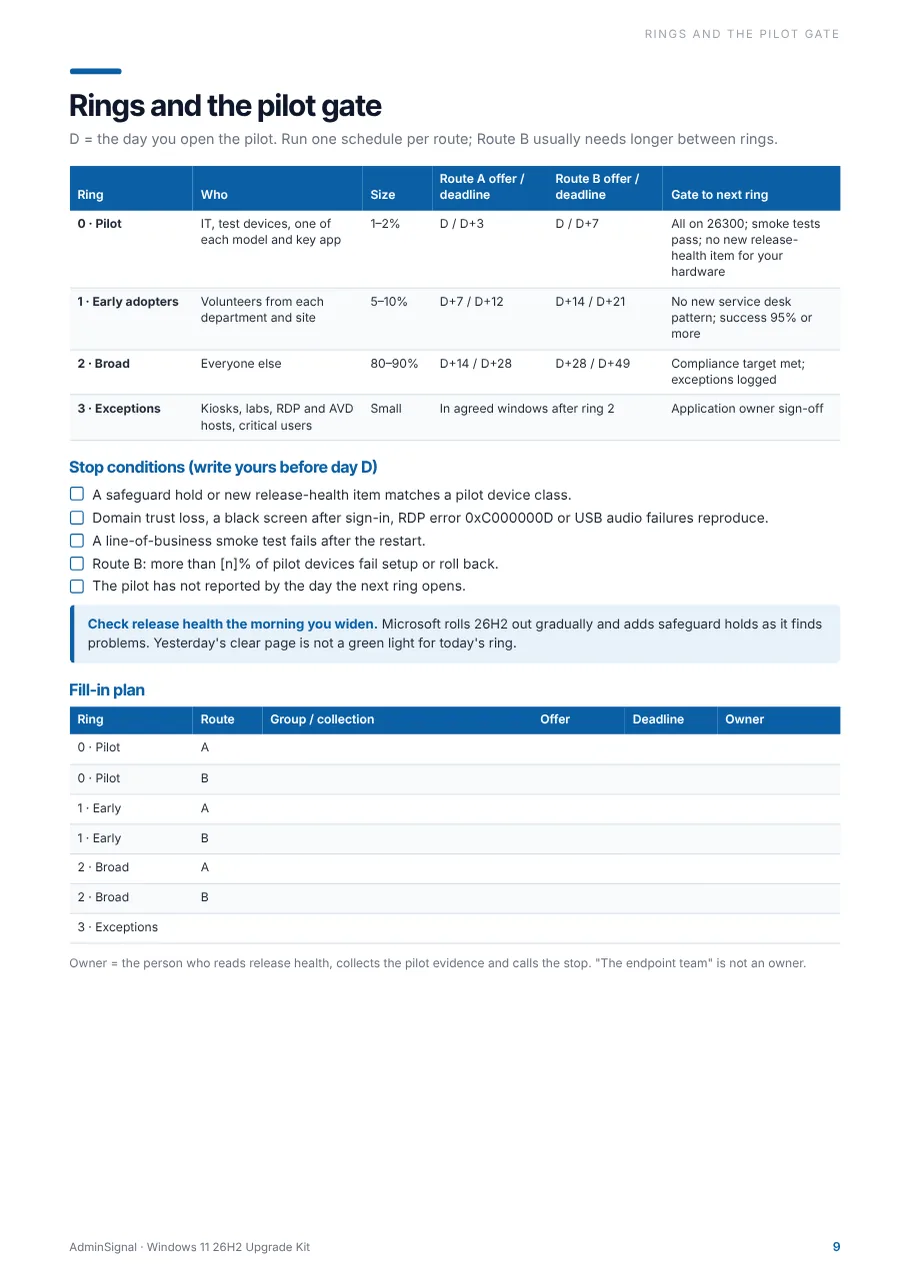
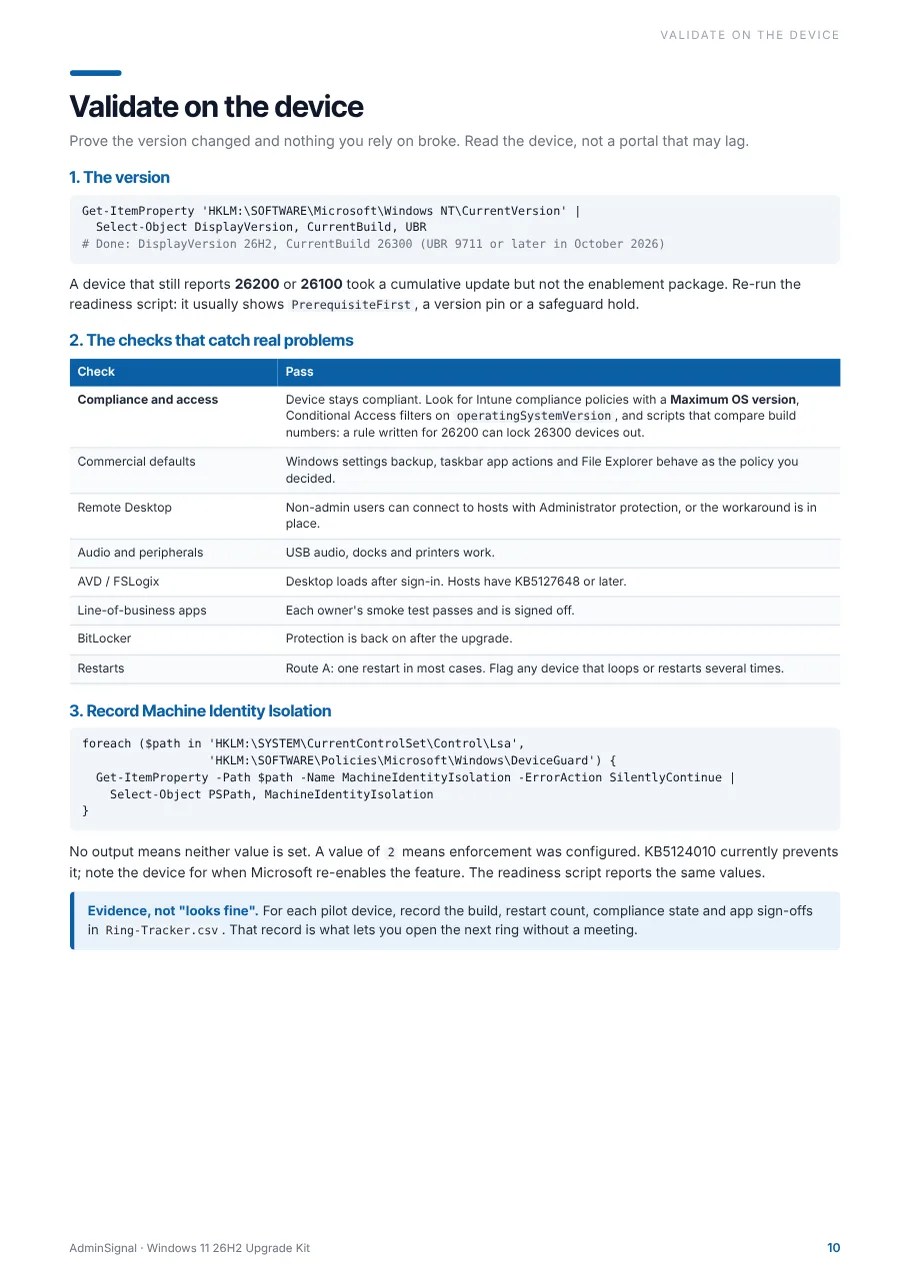
Your rollout, mapped
From inventory to the last exception
The same steps for each route, run as separate tracks so a one-restart update and a full upgrade never share a deployment.
Week -2
Run the readiness script or Intune detection script and count devices per route.
Week -1
Patch PrerequisiteFirst devices, decide the settings backup policy, fix compliance rules that name old builds.
Day 0
Read release health. Open the pilot ring for each route, with a named owner.
Day 3 to 7
Validate on the device, collect sign-offs, check the stop conditions.
Day 7 to 21
Early adopters, then broad. Check release health the morning you widen.
Close-out
Exceptions logged, pins removed, status email sent, lessons recorded.
Tool-agnostic
Notes for the tool you actually deploy with
Intune and Autopatch
- Separate feature update policies for 26H2 and the current version
- Remediations detection for route reporting without WinRM
- Compliance maximum OS version and Conditional Access checks
Configuration Manager
- Windows 11 / Upgrades in the software update point
- Servicing or an upgrade task sequence for Route B
- Separate collections per route
WSUS and Group Policy
- Approve per computer group on each ring date
- Remove the approval to stop a rollout; declining hits every group
- Target feature update version pins, found by the script
Tanium
- A computer group per ring, as for monthly patching
- Compatibility scan as a pre-step for Route B
- Questions to report version and build across a ring
Already read the free guides?
Windows 11 26H2 vs 25H2 and the 26H2 enablement package pilot gate stay free. They explain the decision. The kit is the part you run: the scripts, the full feature update route, rollback for both routes and the comms.
| What you get | Free guides | Kit |
|---|---|---|
| Which version takes which route | ||
| Pilot gate checklist for the enablement package | ||
| Full feature update route for Windows 10 and 23H2 | – | |
| Readiness script with a route and next step per device | – | |
| Intune Remediations detection script | – | |
| Rollback for both routes, including the go-back window | – | |
| User, service desk and status emails | – | |
| Programme tracker and Ring-Tracker.csv | – |

Who made it
Jack Hadcroft
I run Windows feature updates with Configuration Manager, Tanium and Intune. This kit packages the route finder, rings and checks I use, written so they work whichever tool your estate runs on.
More about AdminSignalQuestions
Who is this for?
Endpoint engineers and Windows admins who have to get an estate onto Windows 11, version 26H2: a mix of 24H2 and 25H2 devices, usually some 23H2, and often a Windows 10 tail. It works whether you deploy with Intune, Autopatch, Configuration Manager, WSUS or Tanium.
What exactly do I download?
A zip with seven files: the 14-page PDF playbook, Get-26H2Readiness.ps1, Detect-26H2Readiness.ps1 for Intune Remediations, Upgrade-Runbook.md, Email-Templates.md, Ring-Tracker.csv and a README with the licence. The Markdown and CSV files open in any editor or spreadsheet.
Do the scripts change anything on my devices?
No. Both scripts only read the registry, CIM/WMI and Secure Boot variables. They run on Windows PowerShell 5.1 or PowerShell 7 with no extra modules. Remote targets are queried with Invoke-Command, so they need PowerShell Remoting and admin rights. Review them before you run them, as you would any script.
Do I need Intune?
No. The readiness script works on its own against one PC or a list of computers. The Intune detection script is an extra for estates that use Remediations, which needs one of the Windows licences Microsoft lists for it, such as Windows Enterprise E3 or E5.
What about Windows 10 devices?
The script checks the Windows 11 hardware requirements, including the SSE4.2 CPU check that applies from 24H2. Devices that pass go on the full feature update route. Devices that fail are marked HardwareBlocked, with ESU noted for Windows 10 22H2 while you replace them.
How current is it?
Every date, build and KB number was checked against Microsoft's Windows 11 release information, KB5121794 and the 26H2 release health page between 13 and 21 October 2026. The kit tells you to re-read release health before each ring. Minor version 1 updates are free.
Can my whole team use it?
Yes. One purchase covers a single user or one team inside your organisation, and you can edit everything for internal use. For several teams or an organisation-wide licence, get in touch. Please do not republish or resell the kit.
Can I expense it? Do I get an invoice?
Yes. Checkout runs on Stripe, sold through Link, which acts as the merchant of record. You get a receipt and an invoice PDF by email, with VAT or sales tax handled for your country.
What if it does not help?
Email hello@adminsignal.com within 30 days of purchase and you get a full refund. No forms.
I lost the download. Can I get it again?
The download page works for 7 days after purchase in the browser you bought with. After that, reply to your receipt or email hello@adminsignal.com and the kit will be sent to you again.
Is AdminSignal affiliated with Microsoft or Tanium?
No. AdminSignal is an independent publication. Microsoft, Windows, Intune, Windows Autopatch and Configuration Manager are trademarks of Microsoft Corporation, and Tanium is a trademark of Tanium Inc.
Provided as is, without warranty. Review and test every script, command and procedure in your own environment before production use. See the terms and privacy policy.
Know every device's route by this afternoon
£29 once, for you or your team. Instant download, with a 30-day money-back guarantee if it does not earn its place.